Note
This article records information as of February 17, 2021. The Outlook REST API has been retired. Use Microsoft Graph for new application development. The current app registration procedures for EWS and Exchange Online PowerShell may have changed; see the current documentation for using OAuth with EWS and app-only authentication for Exchange Online PowerShell.
After you register an app in Azure AD in the Azure portal, you might need to preconfigure the permissions it uses under API permissions > Add a permission. Exchange used to appear under Supported legacy APIs on this page, but it disappeared around November 18, 2020.
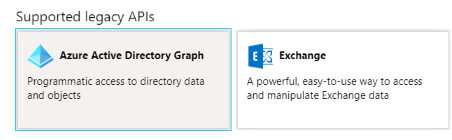
This change followed the announcement that the Outlook REST API would be deprecated. Exchange was removed from Supported legacy APIs to prevent registration of new apps that use the Outlook REST API.
The change to this page affected several APIs, including the Outlook REST API. The following sections describe the impact on each API.
Impact on the Outlook REST API
You can no longer register new apps that use application permissions for the Outlook REST API. No official alternative was provided for this scenario. The Outlook REST API has been retired, so use Microsoft Graph when developing new applications.
New apps that use delegated permissions for the Outlook REST API are not affected if they get access tokens through the Microsoft Identity Platform v2 endpoint, because they do not need to preconfigure permissions in Azure AD. The method described in Getting started with the Outlook REST API on this blog uses the Microsoft Identity Platform v2 endpoint, so you can still use it for testing. However, the Outlook REST API has been retired. Use Microsoft Graph when developing new applications.
Impact on EWS
You can no longer register new apps that use application permissions for EWS (the full_access_as_app permission). The public documentation for using OAuth with EWS was updated to describe how to modify the app manifest to work around this limitation.
New apps that use delegated permissions for EWS (the EWS.AccessAsUser.All permission) are generally not affected by this Azure portal change. When an app gets an access token through the Microsoft Identity Platform v2 endpoint, it can specify permissions dynamically and does not need to preconfigure them in Azure AD. Using the v1 endpoint to get access tokens does affect registration of new apps. However, the public documentation above uses MSAL in its example for delegated permissions. MSAL uses the Microsoft Identity Platform v2 endpoint internally, so you can follow the documentation to register and implement the app.
Impact on Exchange Online PowerShell V2 Module
App registration is required to connect to Exchange Online PowerShell using a certificate, but new apps can no longer be registered through the usual procedure. The public documentation for app-only authentication in Exchange Online PowerShell was updated with a procedure for modifying the app manifest. This blog’s article on connecting to Exchange Online PowerShell non-interactively was also updated to describe the manifest change.