Warning
The Microsoft Graph PowerShell SDK has been generally released. This article describes the preview and does not apply to the generally available version. I have published a separate article, Getting started with the Microsoft Graph PowerShell SDK. For current instructions, see the installation documentation and authentication documentation.
A Microsoft Graph module for PowerShell is available in preview. It acts like a wrapper for using Microsoft Graph from PowerShell. Previously, it was not listed in the PowerShell Gallery, but now that it is available there, it is relatively easy to try.
Microsoft Graph PowerShell SDK GitHub repository
It is still a preview, so use it at your own risk. It also uses the Microsoft Graph /beta endpoint. Support is not available, so if you encounter a problem, you need to open an issue on GitHub yourself.
As discussed in this GitHub issue, module installation fails in some environments. In one of my environments, changing the system locale from my usual Japanese (Japan) to English (United States) allowed installation to succeed.
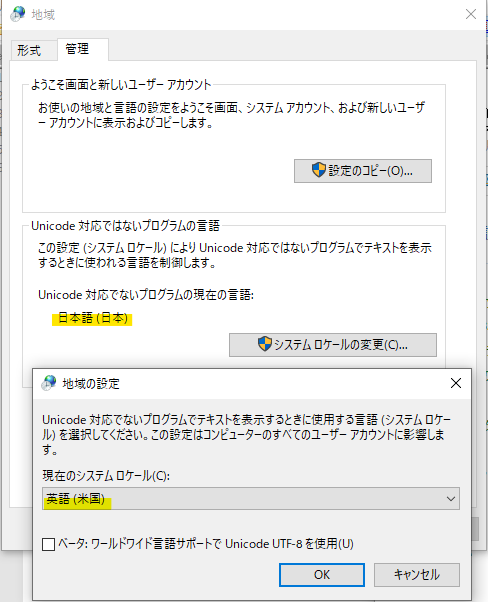
However, in the environment changed to English, dependent modules were placed in a system folder for some reason, and I had to start PowerShell as an administrator to use them. Be aware of this possibility.
Once installation succeeds, use the Connect-Graph command to obtain an access token. Specify the permissions you need in Scopes. For example, to retrieve a list of users, your mail, and your events, use:
1 | Connect-Graph -Scopes "User.ReadBasic.All","Mail.Read","Calendars.Read" |
After you authenticate as instructed, you can use PowerShell commands to interact with Microsoft Graph. To retrieve a list of users:
1 | Get-MgUser |
To retrieve your mail:
1 | Get-MgUserMessage -UserId User01@contoso.com |
To retrieve events, use the following command. At the time of writing, Get-MgUserCalendarView, which retrieves a calendar view, does not seem to work correctly.
1 | Get-MgUserEvent -UserId User01@contoso.com |
If you want to inspect the traffic, you can use Fiddler.
I have not yet tried application permissions, but they appear to require a certificate rather than a client secret.
Note
The current SDK also supports client secrets and managed identities, in addition to certificates, for app-only access. See the authentication documentation for details.
Honestly, from a messaging perspective, it does not seem very useful yet. It may be convenient for tasks that can be completed with a single command, but those tasks are not very common. PowerShell also has Invoke-RestMethod, which offers more flexibility when working with Microsoft Graph. I hope the general release will add something more compelling.