POST https://graph.microsoft.com/v1.0/users/User01@contoso.onmicrosoft.com/events
{ "subject":"Let's go for lunch", "body":{ "contentType":"HTML", "content":"Does late morning work for you?" }, "start":{ "dateTime":"2020-07-28T12:00:00", "timeZone":"Tokyo Standard Time" }, "end":{ "dateTime":"2020-07-28T14:00:00", "timeZone":"Tokyo Standard Time" }, "location":{ "displayName":"Harry's Bar" }, "attendees":[ { "emailAddress":{ "address":"User02@contoso.onmicrosoft.com", "name":"User02" }, "type":"required" } ], "allowNewTimeProposals":true }
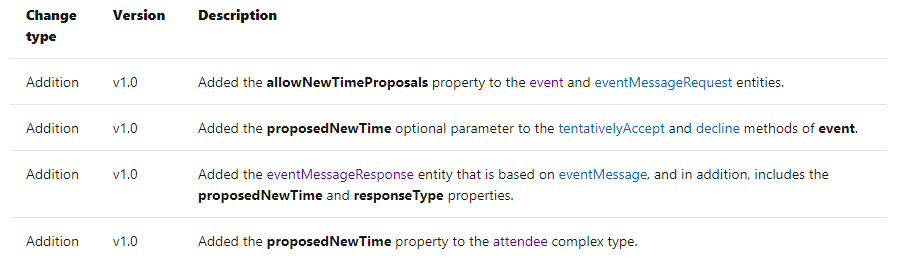
Check the eventMessageRequest received by User02 and confirm that allowNewTimeProposals is true. This example uses $top=1 to retrieve one item for demonstration.
1
GET https://graph.microsoft.com/v1.0/users/User02@contoso.onmicrosoft.com/messages/?$select=subject,microsoft.graph.eventMessageRequest/allowNewTimeProposals&$top=1
1
2
3
4
5
6
7
8
9
10
11
12
13
14
15
16
HTTP/1.1 200 OK Content-Type: application/json
{ "@odata.context":"https://graph.microsoft.com/v1.0/$metadata#users('User02%40rykoma03.onmicrosoft.com')/messages(subject,microsoft.graph.eventMessageRequest/allowNewTimeProposals)", "@odata.nextLink":"https://graph.microsoft.com/v1.0/users/User02@contoso.onmicrosoft.com/messages/?$select=subject%2cmicrosoft.graph.eventMessageRequest%2fallowNewTimeProposals&$top=1&$skip=2", "value":[ { "@odata.type":"#microsoft.graph.eventMessageRequest", "@odata.etag":"W/\"CwAAABYAAAAOmCTRuhGXToj3LolrhhYQAAR1EROc\"", "id":"AAMkAGJiN2FkZTIwLWY0ODMtNDU3Yi04YTZiLTQzMDcyMGI2OWNiNABGAAAAAAC0eyYE7Ih3QZsKeUb6GLCqBwAOmCTRuhGXToj3LolrhhYQAAAAAAEMAAAOmCTRuhGXToj3LolrhhYQAAR1Gx9HAAA=", "subject":"Let's go for lunch", "allowNewTimeProposals":true } ] }
As of July 27, 2020, retrieving an item with /messages/{id} returned null for allowNewTimeProposals. Retrieving the item without specifying an ID, as in the example above, returned the correct value.
Next, User02 tentatively accepts the meeting and proposes a new time. First, retrieve the event associated with the meeting request to get its ID.
1
GET https://graph.microsoft.com/v1.0/users/User02@contoso.onmicrosoft.com/messages/AAMkAGJiN2FkZTIwLWY0ODMtNDU3Yi04YTZiLTQzMDcyMGI2OWNiNABGAAAAAAC0eyYE7Ih3QZsKeUb6GLCqBwAOmCTRuhGXToj3LolrhhYQAAAAAAEMAAAOmCTRuhGXToj3LolrhhYQAAR1Gx9HAAA=?$expand=microsoft.graph.eventMessage/event
Use the event ID and pass the proposed time to the tentativelyAccept action.
1
2
3
4
5
6
7
8
9
10
11
12
13
14
15
16
POST https://graph.microsoft.com/v1.0/users/User02@contoso.onmicrosoft.com/events/AAMkAGJiN2FkZTIwLWY0ODMtNDU3Yi04YTZiLTQzMDcyMGI2OWNiNABGAAAAAAC0eyYE7Ih3QZsKeUb6GLCqBwAOmCTRuhGXToj3LolrhhYQAAAAAAENAAAOmCTRuhGXToj3LolrhhYQAAR1GxteAAA=/tentativelyAccept
{ "comment":"Can you make the next day instead?", "sendResponse":"true", "proposedNewTime":{ "Start":{ "DateTime":"2020-07-29T12:00:00", "TimeZone":"Pacific Standard Time" }, "End":{ "DateTime":"2020-07-29T14:00:00", "TimeZone":"Pacific Standard Time" } } }
Retrieve the eventMessageResponse received by User01 to confirm that it contains the new time in proposedNewTime.
1
GET https://graph.microsoft.com/v1.0/users/User01@contoso.onmicrosoft.com/messages?$select=subject,microsoft.graph.eventMessageResponse/proposedNewTime&$top=1
{ "@odata.context":"https://graph.microsoft.com/v1.0/$metadata#users('User01%40rykoma03.onmicrosoft.com')/messages(subject,microsoft.graph.eventMessageResponse/proposedNewTime)", "@odata.nextLink":"https://graph.microsoft.com/v1.0/users/User01@contoso.onmicrosoft.com/messages?$select=subject%2cmicrosoft.graph.eventMessageResponse%2fproposedNewTime&$top=1&$skip=1", "value":[ { "@odata.type":"#microsoft.graph.eventMessageResponse", "@odata.etag":"W/\"DAAAABYAAADKF8masRMzQ4BmqIbV6OsxAARj4ZQp\"", "id":"AAMkAGYxOTczODY2LTQwYzktNDFmYS05ZTIzLWZmNjAxYmM1MWYwZABGAAAAAACmFAp715xPRpcdN7o1X1D7BwDKF8masRMzQ4BmqIbV6OsxAAAAAAEMAADKF8masRMzQ4BmqIbV6OsxAARkbjgWAAA=", "subject":"New Time Proposed: Let's go for lunch", "proposedNewTime":{ "start":{ "dateTime":"2020-07-30T04:00:00", "timeZone":"Tokyo Standard Time" }, "end":{ "dateTime":"2020-07-30T06:00:00", "timeZone":"Tokyo Standard Time" } } } ] }
You can also find the proposed time in the event, in the attendees collection.
1
GET https://graph.microsoft.com/v1.0/users/User01@contoso.onmicrosoft.com/events/AAMkAGYxOTczODY2LTQwYzktNDFmYS05ZTIzLWZmNjAxYmM1MWYwZABGAAAAAACmFAp715xPRpcdN7o1X1D7BwDKF8masRMzQ4BmqIbV6OsxAAAAAAENAADKF8masRMzQ4BmqIbV6OsxAARkbhBnAAA=?$select=subject,attendees