Note
This article describes behavior observed in 2017 in the Exchange Server Management Shell and remote PowerShell. It does not describe Exchange Online behavior.
The data types returned by the Exchange Management Shell and remote PowerShell can differ.
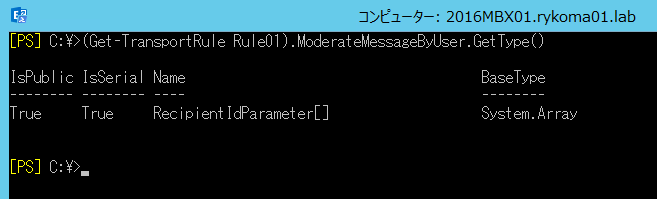
For example, when a transport rule has moderators configured, you can inspect them with ModerateMessageByUser. In the Exchange Server Management Shell, this is an array of RecipientIdParameter objects, which inherits from the System.Array class.
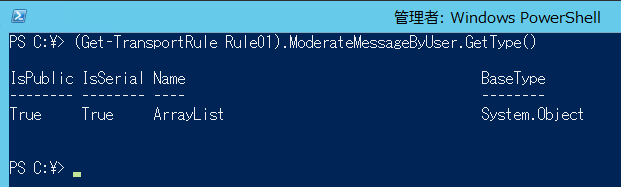
In remote PowerShell, it is an ArrayList.
This difference affects how you get the number of elements. For an array of RecipientIdParameter objects, you can use either the Length property or the Count extension method. For an ArrayList, use the Count property to get the number of elements.
Another factor is the version of PowerShell used by the remote connection client. PowerShell 2.0 does not have this issue, but version 3.0 and later can dynamically access an element’s properties and return an array.
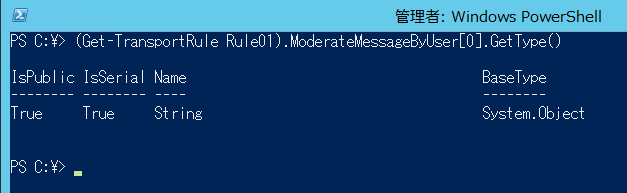
As a result, remote PowerShell can return a value for Length even when the collection is an ArrayList. This happens because each ModerateMessageByUser element is a String, and the String type has a Length property.
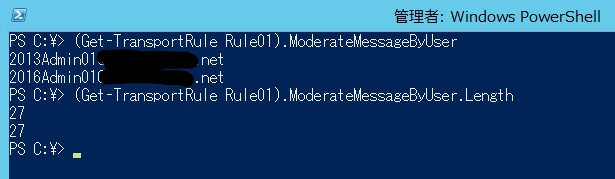
In other words, when you access ModerateMessageByUser.Length in a remote PowerShell session connected from PowerShell 3.0 or later, the result is an array containing the character count of each element. It is not the number of elements.
When writing scripts, account for the data types involved.