This article assumes Exchange Server and describes EWS behavior and an implementation example from 2016. This method does not apply to Exchange Online. EWS disablement is planned for Exchange Online, but Microsoft Graph cannot implement the functionality described in this article.
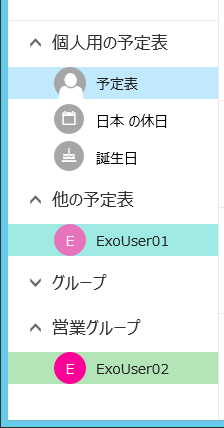
When you open another person’s calendar in Outlook or OWA, it is shown in a list on the left side of the screen. People often ask how to retrieve this information with EWS.
I do not know the correct name for this feature, so I will call it a “calendar shortcut” for convenience. Unfortunately, EWS does not provide a supported API for retrieving this information.
The information is still stored in the mailbox, so it is possible to retrieve it.
Because there is no supported API, the implementation may change in the future. First, we need to confirm how the information is stored.
Calendar shortcuts exist as hidden items in the Common Views folder under the mailbox root.
Each calendar shortcut belongs to a group. Groups are also hidden items in the Common Views folder, and they have the same item class as the shortcuts.
You can identify a group by inspecting its properties. For details, see the following Microsoft Learn documentation:
// Get values from binary data. // See the following page for the size of each value: // https://learn.microsoft.com/en-us/openspecs/exchange_server_protocols/ms-oxcdata/b00b2824-8434-4294-a0e7-b4e336489ccc publicAddressEntryID(byte[] bytes) { using (var reader = new BinaryReader(new MemoryStream(bytes))) { Flags = reader.ReadInt32();
privatevoidGetSharedCalendars(ExchangeService service) { // Define properties. ExtendedPropertyDefinition PidTagWlinkType = new ExtendedPropertyDefinition(0x6849, MapiPropertyType.Long); ExtendedPropertyDefinition PidTagWlinkFolderType = new ExtendedPropertyDefinition(0x684f, MapiPropertyType.Binary); ExtendedPropertyDefinition PidTagWlinkGroupName = new ExtendedPropertyDefinition(0x6851, MapiPropertyType.String); ExtendedPropertyDefinition PidTagWlinkAddressBookEID = new ExtendedPropertyDefinition(0x6854, MapiPropertyType.Binary);
// Get the "Common Views" folder. FolderId rootFolder = new FolderId(WellKnownFolderName.Root); SearchFilter commonViewsfilter = new SearchFilter.IsEqualTo(FolderSchema.DisplayName, "Common Views"); var commonViewsFolder = service.FindFolders(rootFolder, commonViewsfilter, new FolderView(1));
// Get calendar groups. // PidTagWlinkType = 4 means a group. // https://learn.microsoft.com/en-us/openspecs/exchange_server_protocols/ms-oxocfg/1e1e3d0d-00a9-4544-9949-937501d7e235 // PidTagWlinkFolderType = "AngGAAAAAADAAAAAAAAARg==" means a calendar folder. // (This is the value after converting the binary data with Convert.ToBase64String.) // https://learn.microsoft.com/en-us/openspecs/exchange_server_protocols/ms-oxocfg/9708e1e9-254a-400d-8f49-83c8f6a73ded PropertySet groupPropertySet = new PropertySet(BasePropertySet.FirstClassProperties, PidTagWlinkType, PidTagWlinkAddressBookEID, PidTagWlinkFolderType); SearchFilter groupsFilter = new SearchFilter.SearchFilterCollection(LogicalOperator.And, new SearchFilter.IsEqualTo(PidTagWlinkType, 4), new SearchFilter.IsEqualTo(PidTagWlinkFolderType, "AngGAAAAAADAAAAAAAAARg==")); ItemView groupsView = new ItemView(100) { PropertySet = groupPropertySet, Traversal = ItemTraversal.Associated }; var groups = commonViewsFolder.Folders[0].FindItems(groupsFilter, groupsView);
// Get calendars in the group. // PidTagWlinkType = 2 means another user's shared folder. PropertySet calendarPropertySet = new PropertySet(BasePropertySet.FirstClassProperties, PidTagWlinkAddressBookEID); SearchFilter calendarSearchFilter = new SearchFilter.SearchFilterCollection(LogicalOperator.And, new SearchFilter.IsEqualTo(PidTagWlinkType, 2), new SearchFilter.IsEqualTo(PidTagWlinkGroupName, group.Subject)); ItemView calendarView = new ItemView(100) { PropertySet = calendarPropertySet, Traversal = ItemTraversal.Associated }; var calendars = commonViewsFolder.Folders[0].FindItems(calendarSearchFilter, calendarView);
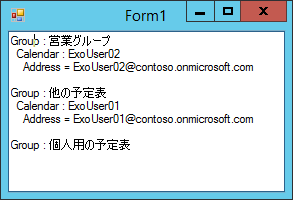
// Get the LegacyExchangeDN used to open the calendar and output the address. byte[] wlinkAddressBookEID; if (calendar.TryGetProperty(PidTagWlinkAddressBookEID, out wlinkAddressBookEID)) { AddressEntryID entryID = new AddressEntryID(wlinkAddressBookEID); NameResolutionCollection resolveResult = service.ResolveName(entryID.X500DN, ResolveNameSearchLocation.DirectoryOnly, false); textBox1.Text += " Address = " + resolveResult[0].Mailbox.Address + "\r\n\r\n"; } } } }
This retrieves the groups and the calendar shortcuts that belong to each group.
This method cannot retrieve the default calendars that should appear under “My Calendars” or the calendars of users for whom you have full access.
This is because the code filters for PidTagWlinkType = 2.
If you also need to retrieve these items, you must use additional conditions. However, this requires parsing PidTagStoreEntryId.