The Microsoft Graph PowerShell SDK consists of dozens of modules. To install all of them, you can install the Microsoft.Graph module, which contains references to the individual modules. Because there are many modules, this can take some time.
If you only need specific commands, you can install and use only the modules that contain those commands.
For basic information about installing the Microsoft Graph PowerShell SDK, see the following documentation:
Install the Microsoft Graph PowerShell SDK
Prepare
The Microsoft.Graph.Authentication module is required to use the Microsoft Graph PowerShell SDK, regardless of which other modules you use. Install it first:
1 | Install-Module Microsoft.Graph.Authentication |
You can use the Find-MgGraphCommand command to find which module contains a command. This command is also included in the Microsoft.Graph.Authentication module.
Find a command’s module in the documentation
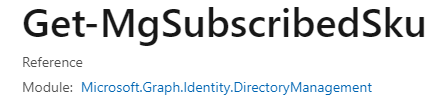
Open the documentation page for the command you want to use to see which module contains it. For example, the page for Get-MgSubscribedSku shows that it is included in the Microsoft.Graph.Identity.DirectoryManagement module.
Get-MgSubscribedSku (Microsoft.Graph.Identity.DirectoryManagement) | Microsoft Learn
Find a command’s module with Find-MgGraphCommand
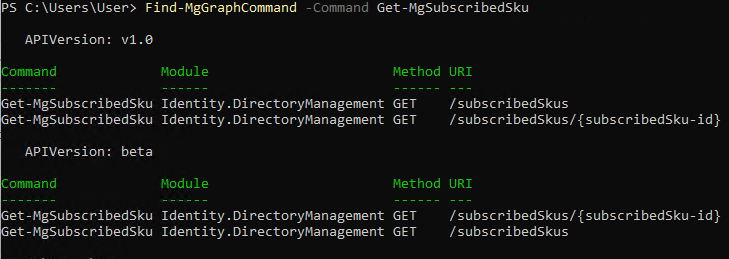
You can also use Find-MgGraphCommand to find which module contains a command. For example, run the following command to look up Get-MgSubscribedSku:
1 | Find-MgGraphCommand -Command Get-MgSubscribedSku |
The Module field in the output shows that the command is included in the Microsoft.Graph.Identity.DirectoryManagement module.
Find an API’s command in the documentation
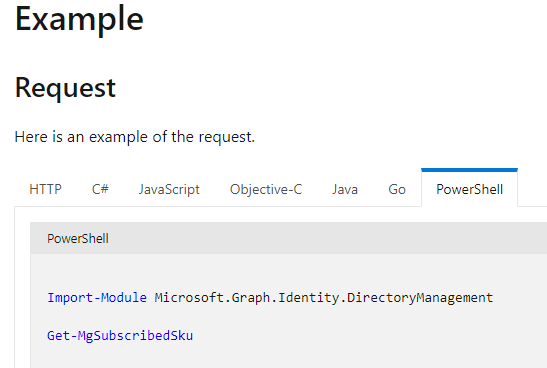
If you know which API you want to use, open its documentation page and check the Example section to find the corresponding command and module. For example, see the following page for the /subscribedSkus API:
List subscribedSkus - Microsoft Graph v1.0 | Microsoft Learn
Find an API’s command with Find-MgGraphCommand
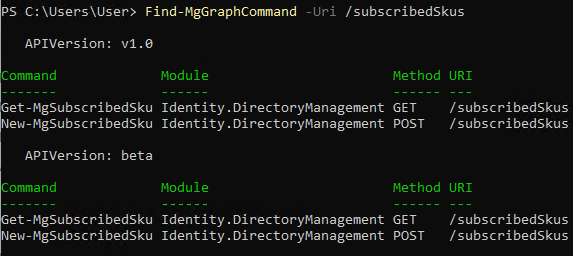
You can also use Find-MgGraphCommand to find which module contains commands for an API. For example, run the following command to look up the /subscribedSkus API:
1 | Find-MgGraphCommand -Uri /subscribedSkus |
The Command and Module fields in the output show that the Get-MgSubscribedSku and New-MgSubscribedSku commands are included in the Microsoft.Graph.Identity.DirectoryManagement module.
Install a specific module
After you find the module you need, install it with Install-Module, just like the Microsoft.Graph.Authentication module. Then connect to Microsoft Graph with Connect-MgGraph and use the commands.